
OnlyFans Safety Basics for Subscribers, Not Creators
OnlyFans is a subscription platform, and most safety advice online is written for creators. This article flips that and looks at the subscriber side instead. The habits below are simple, they cost nothing, and together they cover the large majority of risks a paying viewer will ever run into. Nothing here replaces common sense, but it does give that common sense a structure.

The platform has no built-in discovery feed or directory. That single design choice explains why so many ranking sites exist, and why subscribers often arrive at a page through a link rather than through the site itself. It also means the first safety decision usually happens before you ever log in. You choose which page to trust, and that choice shapes everything that follows.
Account hygiene fundamentals
A subscription account holds payment details, message history, and often a saved card. That makes it worth protecting for reasons that have nothing to do with privacy alone. Account takeover on a subscription platform is mostly about money and access, not about content. Most takeovers start with a reused password or a code sent to an email inbox that was already compromised elsewhere.
Login hygiene is boring, which is exactly why it works. The habits below reduce takeover risk more than any single setting. None of them require technical knowledge, and all of them take under ten minutes to set up.
- Use a password that exists nowhere else, and let a password manager generate and store it.
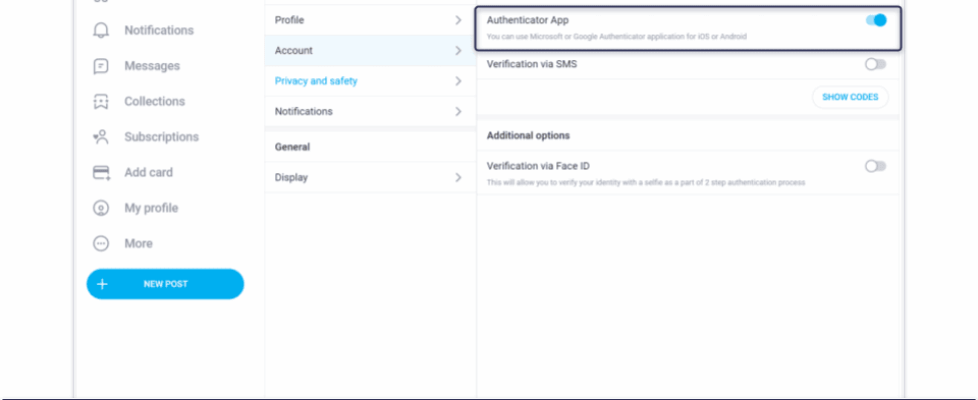
- Turn on two-step authentication and keep the backup codes somewhere offline.
- Use a dedicated email address for the account so a breach elsewhere does not expose it.
- Review active sessions periodically and sign out of devices you no longer recognise.
- Never enter login details through a link in a direct message, even if the page looks familiar.
- Change the password immediately if a login alert arrives that you did not trigger.

Payment privacy choices
Payment method is the part of the experience most subscribers think about last. It deserves more attention, because the method determines what a page owner can see about you and what a data breach could expose. Different methods trade convenience against separation in different ways. The table below compares three common approaches by the level of separation each one provides.
| Method | Privacy level | What it separates |
|---|---|---|
| Direct bank card | Low | Nothing; the card is tied to your real identity and full banking history. |
| Payment wallet | Medium | Hides the card number from the merchant but keeps a real-name account behind it. |
| Prepaid card | Higher | Separates the transaction from your main account and limits exposure to the loaded amount. |
Prices themselves follow a narrow band. Paid subscriptions run from $4.99 at the minimum to $49.99 at the maximum, with most pages sitting between $4.99 and $15 and averages landing around $5 to $10. There is no base price below $4.99; only a promotional first month may dip under that figure. Some pages set the price to $0, which makes them free to follow, and those pages earn through pay-per-view messages and tips instead.
Practical tip: a promotional first month below $4.99 is normal, but a page that advertises a permanent price under $4.99 is not describing how the platform works. Treat the offer as a signal to check the page more carefully before entering payment details.
Whichever method you pick, remember the platform fee. Twenty percent is taken on everything, whether that is a subscription, a tip, or a pay-per-view unlock, and the creator keeps the remaining eighty percent. That split applies to free pages too, so a tip on a free page is charged the same way as a paid subscription.

Recognising fake pages and profiles
Fake pages tend to fail the same handful of checks, and the checks take seconds. The goal is not to judge a page by its size. The goal is to notice when the page’s behaviour does not match how the platform actually works. The table below pairs a weak signal with a stronger alternative for each category.
| Signal | Weaker example | Stronger example |
|---|---|---|
| Account age | Created days ago with a large following | Months of consistent posting history |
| Media count | Few posts but constant payment requests | Post count that grows steadily over time |
| Contact route | Pushes you to another app immediately | Keeps conversation inside the platform |
| Price changes | Price jumps repeatedly with no notice | Price stable, changes explained in posts |
Ranking services exist partly because the platform offers no directory of its own. A comparison site such as BestOnlyFans lines up public profile prices, current promotions, posting activity, and media counts so a reader can see several pages side by side. That kind of service only compares information that is already visible on the profiles themselves. It does not verify identity, and it cannot tell you whether a specific person is trustworthy.

Suspicious contact handling
Requests to move a payment off the platform are the clearest warning sign a subscriber will encounter. They usually arrive politely, framed as a favour or a discount. The sequence below is the order that keeps you protected if it happens. A practical starting point is best only fans influencer, which lists pages by the signals above.
- Stop replying and do not send anything, including screenshots or account details.
- Take screenshots of the conversation before blocking, so you have a record.
- Report the message or profile using the platform’s own reporting tools.
- Block the account and remove any saved payment method linked to it.
- Check your bank or wallet statement for anything you did not authorise.
- If money moved, contact your payment provider promptly and explain the situation.
Off-platform payments remove every protection the platform provides. There is no dispute process, no record of the transaction inside your account, and no way for support to trace what happened. The twenty percent platform fee exists partly because the platform handles that layer. Paying outside it means paying for a service without the service.

Protecting personal details
Chats feel private, and that feeling encourages oversharing. Information shared in a direct message can be screenshotted, saved, and reused long after a subscription ends. The list below covers what to keep out of conversations regardless of how long you have been subscribed.
- Your full legal name, home address, or workplace.
- Photos that show your face alongside identifying details such as a street sign or licence plate.
- Bank account numbers, card numbers, or one-time verification codes.
- Details about your family, daily routine, or travel plans.
- Any other account handles you use elsewhere under the same identity.
Two-step authentication is the single setting worth checking first on any account. It sits in the security section of account settings and takes a couple of minutes to enable. Once it is on, a stolen password alone is no longer enough to get in. That changes the maths for anyone trying to break into an account.

After a problem occurs
If something does go wrong, the order of response matters more than speed. Secure the account first, then report, then review charges. Doing it in that order prevents further loss while you deal with the paperwork.
- Change the password and sign out of all other sessions.
- Re-check two-step authentication and regenerate backup codes.
- Report the page or message through the platform’s reporting flow.
- Review recent charges and flag anything unfamiliar to your payment provider.
- Keep written notes with dates, amounts, and what was agreed.
One detail catches subscribers out during cancellations. When a creator raises the subscription price, auto-renew stops automatically; existing access continues until the current paid period ends. That means a price change does not cut you off mid-month, but it does mean the next renewal will not happen unless you opt in again. Understanding this prevents both surprise charges and surprise cut-offs.
Monthly costs are easier to estimate once you separate the components. A subscription sits in the range described earlier, and a free page costs nothing up front but can generate pay-per-view unlocks and tips. Budgeting by page rather than by month is usually more accurate, because activity on free pages varies far more than the subscription price does.
Mobile security matters when a subscription is managed from a phone rather than a laptop.
Extra detail
Most problems trace back to a small number of repeated mistakes rather than to clever attacks. Avoiding the list below covers more ground than any single tool. It also makes the rest of the advice in this article easier to follow.
- Reusing a password that already appears in another account.
- Skipping two-step authentication because it feels inconvenient.
- Paying outside the platform after a friendly request.
- Leaving a saved card on an account you no longer use.
- Assuming a large follower count proves a page is genuine.
- Sharing identifying photos in a chat that has no retention limit.
- Ignoring small unfamiliar charges because the amount looks trivial.
Comparison sites fill a gap the platform leaves open, since there is no native directory to browse. A ranking service such as BestOnlyFans gathers public pricing, promotion details, activity levels and media counts into one view. Used that way, it is a starting point for research rather than a guarantee. The final decision still belongs to the subscriber.
BestOnlyFans refreshes its rankings every month.
FAQ
Can a subscriber see who else is subscribed to a page?
No, subscriber lists are not public, so only the creator and the platform can see who is subscribed.
Does a price increase cancel an existing subscription?
Auto-renew stops when the price rises, but current access continues until the paid period ends.
Is a promotional price below $4.99 a sign of a fake page?
Not by itself, since first-month promotions may dip below $4.99 even though no base price goes lower.
What is the safest payment method for a subscription?
A prepaid card offers the most separation, while a payment wallet sits in the middle and a bank card offers the least.